We scanned 10 AI-built apps. Here's what every prompt is hiding.
TL;DR: 9 out of 10 of the AI-coded apps we scanned have their database credentials embedded in the client JavaScript. 0 out of 10 set a Content-Security-Policy. Here's what that means, what we did and didn't do to find out, and what AI coding tools should fix in their defaults.

A live Qualmly scan of one of the audited apps. Score 47/100. Two categories failed, one warning. Stripe sk_live_ in the bundle, admin RPCs callable from the client, no CSP header.
The headline
We took 10 publicly-listed apps from the showcases of two of the biggest AI coding platforms — 7 from Lovable's curated madewithlovable.com and 3 from bolt.host — and ran a passive static audit on each. No active probing. No backend scanning. We read the publicly-served HTML and JavaScript bundle of each app, the same way an attacker spends their first 60 seconds of recon.
Here's what we found across the 10:
9/10 expose a Supabase project URL + anon key in their client JavaScript bundle.
0/10 set a Content-Security-Policy header.
6/10 reference /admin/* routes in the client bundle, up to 10 admin sub-routes in one app.
3/10 call admin-flavoured RPC functions (rpc("get_admin_statistics"), rpc("move_candidate_stage")) directly from client JavaScript.
1/10 ships 127.0.0.1 to production — a dev fallback URL that survived the build.
1/10 ships realistic-looking fake Stripe keys (sk_live_abc123…) as UI placeholder text in an admin dashboard.
7/10 ship console.log statements to production. Median 15 per bundle. Maximum 52.
0/10 marketing-tier Lovable apps on custom domains had HSTS preload set. 2/3 Bolt apps had it by default — Bolt's hosting beats Lovable's on this specific header.
The mean quality score across the batch is 65.7 / 100. Range: 51 to 82. Not catastrophic. Not safe.
Methodology — and what we explicitly did not do
This part matters more than the findings.
What we did: we curl-ed the public HTML and the main JavaScript bundle of each app's homepage. We grep-ed the bundles for known credential prefixes (Supabase URLs, Stripe keys, AWS access key IDs, OpenAI keys, GitHub tokens, generic JWTs). We read the HTTP response headers for each domain. We compared bundle sizes, dev-artifact counts (console.log, TODO, XXX, localhost, .env references), and visible auth-provider surface.
What we did not do: we did not actively probe any backend. We did not test Row-Level Security policies, even though a Supabase anon key publicly served by the client app is technically usable to do so. We did not submit forms, did not attempt auth bypass, did not call any RPC functions. The line between recon and unauthorized access matters, and we stayed firmly on the recon side.
This is not a penetration test. This is the report you get from the first 60 seconds of an attacker's day.
We're publishing aggregate stats only. No app is named in the findings below until its owner has been contacted, given a 14-day window, and either fixed the issue or consented to being named as a positive case study.
The dominant pattern
Every Lovable and Bolt app we scanned uses Supabase. That's not a problem on its own — Supabase is a fine choice. But the AI-generated default architecture creates a specific class of risk that none of the 10 apps had visibly mitigated.
Here's how the pattern works:
The Supabase JavaScript client requires the project URL and the anon key in the browser. This is by design. Supabase documents it.
The anon key is a JWT signed by Supabase's project secret. Decoding it reveals the project ID and the role (anon). It is not a vulnerability on its own.
Row-Level Security (RLS) policies on every table are what actually protect the data. If a table has RLS off, or a policy has a bug, any visitor can use the anon key + Supabase REST API to query it.
AI coding tools generate Supabase schemas from natural-language prompts. They mostly get RLS right. The error rate is non-zero.
If the client app calls an RPC function by name (e.g. rpc("get_admin_statistics")), that function bypasses RLS unless it has an explicit role check inside its SQL body. We saw three apps in the batch with this exact pattern.
The full failure mode: an authenticated user runs supabase.rpc("get_admin_statistics") from their DevTools console. If the function doesn't enforce auth.uid() / role checks in its body, it returns admin data to any logged-in user.
We did not test whether any specific app is vulnerable to this. We're calling out the pattern because it's how most Supabase RLS talks at conferences in 2025 started.
Five concrete findings (anonymized)
1. The 10-route admin scaffold
One app in the batch — a UGC-fan-archive platform — ships a client bundle that references /admin, /admin/features, /admin/generate, /admin/imports, /admin/oauth/clients, /admin/reports, /admin/statistics, /admin/unlisted-artists, /admin/users, and at least three more sub-routes. Plus direct client-side calls to RPC functions named get_admin_statistics, get_admin_time_series, get_checked_in_users, and others.
If those RPC functions don't have IF NOT EXISTS (SELECT 1 FROM user_roles WHERE user_id = auth.uid() AND role = 'admin') at the top of their bodies, any authenticated user can call them.
2. The fake API keys that nuke every secret scanner
An AI-applicant-tracking platform ships sk_live_abc123def456ghi789xyz and sk_test_def456ghi789abc123xyz as UI-display placeholder text in a fake "API Keys" admin dashboard. They are not real secrets, but every CI secret scanner — GitGuardian, TruffleHog, GitHub secret scanning — will flag them on every commit.
The deeper issue: the existence of an admin UI that renders full API keys to admins is a UX anti-pattern. Keys should be shown once on creation, then masked forever. Fake placeholder values that match Stripe's regex make this hard to verify.
3. The localhost that shipped to production
One B2B retirement-plan marketplace ships 127.0.0.1 in its production bundle. Almost certainly dead code from a process.env.API_URL || "http://127.0.0.1:3000" pattern. The actual finding isn't the URL itself — it's that the build did not fail on the missing env var.
4. The insurance app with crypto sign-in
An insurance-agent quicklink portal — handling regulated data in the United States — has signInWithSolana and signInWithEthereum enabled in its Supabase Auth client. It's deployed on a default *.bolt.host subdomain rather than a custom domain, with no HSTS preload on a custom domain.
If this portal touches PHI, the defaults are insufficient for a US regulated-industry app. Crypto wallet auth on an insurance portal is a tell that nobody on the project audited the auth provider list before shipping.
5. The zero-CSP rule
All 10 apps. Zero Content-Security-Policy headers.
A single compromised ad network, one typo'd script src, one malicious npm dependency in the build pipeline — and any of these apps injects arbitrary JavaScript into every user session.
CSP is a one-line HTTP header. Default-off is the wrong default.
What AI coding tools should fix in their defaults
Six changes that would close most of what we found:
Emit Content-Security-Policy by default on every Cloudflare Pages / Netlify / *.bolt.host deploy. Start in Content-Security-Policy-Report-Only mode so it doesn't break anyone's existing app.
Disable auth providers that weren't requested in the prompt. If the user said "make me an insurance portal," don't leave Solana and Ethereum on.
Generate an RLS policy + a pgTAP test for every table the AI creates. Refuse to deploy if the tests fail.
Strip console.log and console.debug from production builds by default. Vite has plugins for this. The templates should include them.
Fail the build on unset env vars. No silent || "http://localhost" fallbacks.
Render admin routes as 404 (not shell) when the user lacks the role. Small pattern, huge surface reduction.
None of these require changing the user's prompt. They're defaults the platform owns.
What you can do today
If you've shipped something with Lovable, Bolt, v0, Cursor, Copilot, Claude Code, Windsurf, or Replit, there are three things worth doing in the next hour.
1. View source on your live site. Search for supabase.co and any eyJ... strings. If you find them, that's expected — but it means the entire security model rests on RLS being right. Open your Supabase dashboard, click into each table, and verify RLS is enabled and policies are testable.
2. Run an automated audit. We built Qualmly for exactly this. Paste your URL, get a report in 30 seconds with a fix prompt for whichever AI coding tool you use, ready to paste back into the chat. Costs about $0.03 of Anthropic API credits per scan. Open source on GitHub.
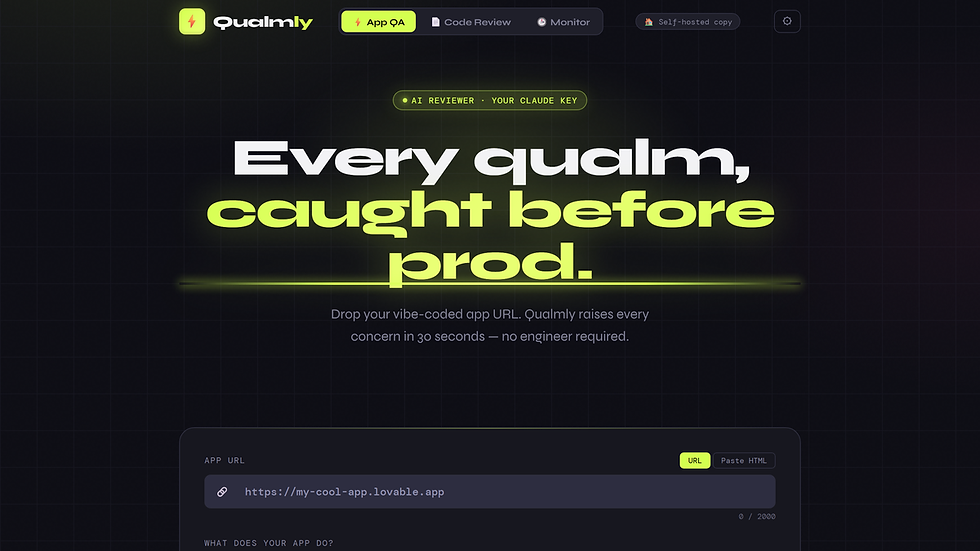
qualmly.dev — drop a URL, get a 30-second audit. BYOK Anthropic API key, your code never touches our servers.
3. Add a Content-Security-Policy to your hosting config. Cloudflare Pages, Netlify, and Vercel all let you set headers in a _headers or vercel.json file. If you do nothing else, do this.
Qualmly also has two sister surfaces for engineering teams that ship continuously:
GitHub Action that audits every pull request on the way in. Free. github.com/marketplace/actions/qualmly-audit
Python CLI for APK / IPA scanning — same prompt, same 9 secret patterns, same 8 categories. pipx install qualmly-mobile
If you want to see what a Qualmly report looks like before grabbing an API key, the live demo loads in one click — no signup, no commitment.
New today: continuous monitoring
The one-shot audit catches the foot-shots that are present right now. The harder problem is what happens after launch — your AI coding tool keeps writing new endpoints every week, and the foot-shots accumulate quietly.
Qualmly's new Pro tier is a weekly automated rescan of one app URL. Drop the URL once, get a diff alert in your inbox when findings change. $99/yr per app, BYOK Anthropic so the cron pulls ~$0.03/week off your own credit, not ours.

Continuous monitoring — drop a URL, get a weekly diff in your inbox when findings change.
The Pro dashboard tracks each watch's last scan, builder, interval, and status. You can add up to 25 watches per account. Cancel any time; data deleted on cancel.

The Monitor dashboard. Three active watches in this example: matchwise.app weekly, growthbook-staging biweekly, demo.qualmly.dev daily.
BYOK is the unfair-margin part of the design. Most security SaaS marks up an LLM API by 5×. Qualmly doesn't touch your Anthropic credit — you pay for the watch slot, not the AI calls. Same scanner runs against your URL every week regardless of how cheap or expensive Anthropic gets.
Subscribe at qualmly.dev → Monitor.
Disclosure status
The 10 apps in this batch have been notified individually with the specific findings on their app, a 14-day window, and three options: stay anonymous in any future writeup, be named as an example that fixed it, or co-author a short follow-up paragraph about what their team found internally.
We'll publish a follow-up post in 30 days with the response rate and named case studies for any team that opted in.
About this audit
This audit was run by DarkPixel Consulting — a web and app development practice that ships AI-coded apps the right way the first time. We built Qualmly because every project we audited at the consulting layer had at least three of the patterns above. The tool is open-source and BYOK (bring your own Anthropic API key) — your code never touches our servers.
If you want a deeper engagement — full audit by a human team, on-prem hosting, custom prompts tuned to your stack — we're accepting work.
If you want to run this on your own app right now, Qualmly is free to use, $15 for a personal commercial license, $49 for an agency white-label tier, $99/year for the Pro continuous-monitoring tier. First 100 buyers get the launch price.
Either way: ship it right. The defaults are not your friend.
Comments